System Calls
A System Call (aka syscall) is the formal programmatic interface through which a user-space application requests a privileged service from the operating system kernel.
A program running in the User Mode cannot access the memory, read files, connect to other processes. Those are privileged actions. If a program wants to do such things, it Must ask the kernel using the System calls API.
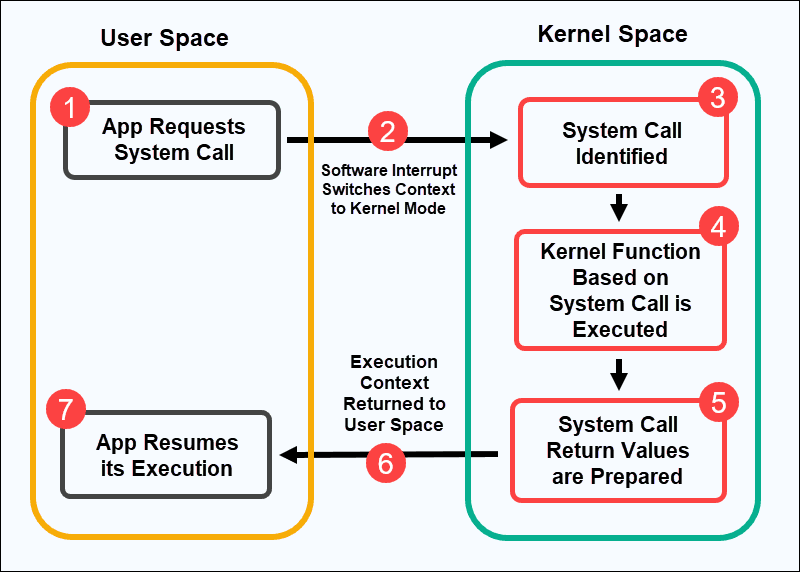
When an application invokes a system call, the CPU pauses user program execution and transfers control to the kernel via a hardware trap or software interrupt:
Transition from user mode to kernel mode
This transition is done through something called "setting a trap". A Trap is a special type of signal generated by the CPU when a running program executes an instruction that requires immediate intervention by the operating system kernel.
When a trap occurs, the CPU pauses the program's normal execution flow and switches from User Mode (Ring 3) to Kernel Mode (Ring 0), transferring control to a specific OS handler routine called a trap handler.
Traps are Software Interrupts.
Major Categories of System Calls
System calls are grouped into five primary functional categories:
| Category | Description | Common C / POSIX (Linux) Examples | Windows API Equivalents |
|---|---|---|---|
| Process Control | Creating, terminating, and managing processes and threads. | fork(), exec(), exit(), wait() | CreateProcess(), ExitProcess() |
| File Management | Opening, reading, writing, closing, and manipulating files or directories. | open(), read(), write(), close() | CreateFile(), ReadFile(), WriteFile() |
| Device Management | Requesting access to hardware devices (monitors, keyboards, network interfaces). | ioctl(), read(), write() | SetCommState(), DeviceIoControl() |
| Information Maintenance | Getting or setting system metadata (time, process ID, system status). | getpid(), alarm(), time() | GetSystemTime(), GetCurrentProcessId() |
| Communication & IPC | Exchanging data between processes (network sockets, shared memory, pipes). | socket(), bind(), connect(), shmget() | CreatePipe(), CreateFileMapping() |
| More details here - https://www.geeksforgeeks.org/operating-systems/different-types-of-system-calls-in-os/ |
API Wrappers vs. Raw System Calls
using Raw system calls require keeping track of each ones ID. Some will be different from platform to platform, so its tedious. That's why developers use API wrappers for easy to use and convenience
Another reason is Performance. Libraries can buffer data in user space. For example, fwrite() accumulates small pieces of text into a memory buffer and executes a single write() system call once the buffer is full, minimizing expensive transitions between User and Kernel Mode.