User Mode vs Kernel Mode
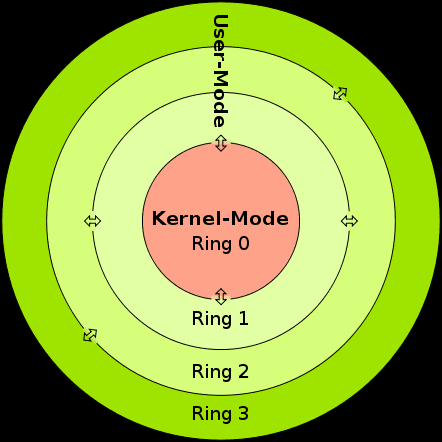
User Mode and Kernel Mode are two distinct execution states enforced by modern computer processors (CPUs) to protect system memory and hardware from buggy or malicious software.
The division relies on hardware-level protection mechanisms built into the CPU (often referred to as Privilege Rings).
1. User Mode (Restricted Mode)
In User Mode (CPU Ring 3), applications execute with strict restrictions. Every standard application you launch (such as a web browser, media player, or game) runs in User Mode.
- Restricted Hardware Access: Applications cannot talk directly to physical hardware (e.g. hard drive, network interface, or graphics card).
- Isolated Memory: A User Mode process gets its own virtual memory space. It cannot access or overwrite the memory allocated to other user processes, nor can it touch kernel memory.
- Failure Safety: If an application encounters a critical error (like a null pointer dereference), it simply crashes individually. The operating system cleans up its memory while the rest of the computer continues running smoothly.
2. Kernel Mode (Privileged / Master Mode)
In Kernel Mode (CPU Ring 0), the core operating system code and device drivers execute with unrestricted access to the computer's resources.
- Direct Hardware & Memory Control: Code executing in Kernel Mode can run any CPU instruction and access any memory address across the physical RAM modules.
- Hardware Interfacing: It directly controls the CPU, memory controllers, storage devices, and motherboard chipsets.
- High Risk / Zero Isolation: There are no safety barriers. If a bug, division-by-zero error, or memory corruption occurs in Kernel Mode (e.g., inside a faulty graphics driver), the entire system halts immediately to prevent data loss, causing a Kernel Panic on Linux/macOS or a Blue Screen of Death (BSOD) on Windows.
- The Crowdstrike Bug was a kernel level crash that caused a huge outage.
Transition Between Modes: System Calls
Because a User Mode application cannot talk to hardware on its own, it must ask the kernel to perform hardware tasks on its behalf using a System Call (Syscall).
       USER MODE (Ring 3)              KERNEL MODE (Ring 0)
┌──────────────────────────────┐    ┌──────────────────────────────┐
│ User Application             │    │ Operating System Kernel      │
│                              │    │                              │
│ 1. Wants to read a file      │    │                              │
│ 2. Issues a System Call ─────┼───►│ 3. Validates permissions     │
│                              │    │ 4. Reads data from disk      │
│ 6. Resumes program execution │◄───┼─── 5. Copies data to app     │
└──────────────────────────────┘ └──────────────────────────────┘- Trigger: An application calls an OS API function (e.g.,
fread()in C to read a file from the hard drive). - Mode Switch: The CPU triggers a special software interrupt or system call instruction, forcing the processor to switch its mode bit from Ring 3 (User) to Ring 0 (Kernel).
- Execution: The OS verifies that the app has permission to read the file, fetches the data from the physical drive, and copies the result into the app's buffer.
- Return: The CPU switches back from Kernel Mode to User Mode and returns control to the application.